Best default: an accountant-managed cloud ledger. Best for overseas trade: multicurrency accounting. Best for stock-led businesses: inventory-connected accounting. The best accounting software for UAE free zone companies in 2026 is the system that matches your transactions, preserves supporting evidence and gives an accountant clear ownership of the close.
TL;DR
- The best accounting software for UAE free zone companies depends on transaction complexity, not the free zone name.
- Choose Finanshels for accounting services, not as a standalone accounting software subscription.
- Prioritise bank reconciliation, document access, permissions and usable exports before advanced dashboards.
- Test multicurrency, inventory or group reporting only when your business needs those workflows.
For businesses that need someone to maintain the books, Finanshels provides bookkeeping, accounting, tax and CFO consultation services. Separate that service decision from the software decision: a subscription and an accountant solve different problems.
Why this matters
A software demonstration starts with a clean dashboard. Your accounting starts with missing receipts, bank charges, customer credits and transactions that need explanation. Choose around those exceptions, not the demonstration's easiest invoice.
For a 2026 selection, write down who enters transactions, who resolves discrepancies and who approves the finished accounts. If those responsibilities remain unclear, changing software leaves the underlying problem untouched.
This guide ranks accounting setups by business need rather than publishing an unsupported league table of vendors. The default comes first; the remaining options address distinct operating requirements.
What makes the best accounting software for a free zone company?
Use these six criteria before comparing subscriptions:
- Reconciliation: Can your accountant match bank activity, investigate differences and identify unfinished work?
- Evidence: Can you retrieve the invoice, receipt, contract or explanation behind an entry?
- Permissions: Can you separate data entry, approval and administration without sharing logins?
- Reporting: Can the system produce understandable financial reports and supporting transaction detail?
- Business fit: Does the workflow accommodate your actual currencies, stock movements or separate entities?
- Exit access: Can you export balances, transactions and supporting records in usable formats?
Treat these as demonstration requirements, not assumed features. Ask the provider to show each workflow in the specific edition and configuration you are considering.
Accounting setups at a glance
| Ranked setup | Best for | Standout capability to verify | Key limitation |
|---|---|---|---|
| Accountant-managed cloud ledger | Owners who need maintained books | Clear responsibility for reconciliation and close | Results depend on the agreed service scope |
| Multicurrency accounting | Businesses trading across currencies | Traceable conversion and settlement differences | Currency settings need careful setup |
| Inventory-connected accounting | Businesses buying and selling stock | Traceability between stock movement and ledger entries | Incorrect item data spreads into reporting |
| Multi-entity accounting | Groups with separate legal entities | Separate books with a controlled group reporting process | Group reporting needs consistent account mapping |
| Owner-operated cloud ledger | Owners with accounting capacity and simple workflows | Direct control over routine bookkeeping | The owner retains the work and review burden |
1. Accountant-managed cloud ledger: best for maintained books
An accountant-managed cloud ledger combines accounting software with an agreed bookkeeping service. The important distinction is responsibility: someone must resolve unmatched transactions and explain the balances, not simply give you access to a dashboard.
Best for: Free zone business owners who want accounting work handled rather than another application to manage.
Finanshels offers bookkeeping, accounting, auditing and CFO consultation. When discussing an engagement, ask which activities are included, what information your team supplies and how unresolved items are communicated. Do not assume a particular software platform or integration is included.
Accountant-managed ledger pros:
- Gives you a clear place to assign bookkeeping responsibility.
- Connects transaction processing with professional accounting support.
- Lets you define reporting outputs alongside the work required to produce them.
Accountant-managed ledger cons:
- Service boundaries need to be agreed explicitly.
- Your team still needs to provide documents and business explanations.
- Software access alone does not establish who approves the accounts.
Verdict: Buy this setup when your main problem is unfinished accounting work, not missing software features.
2. Multicurrency accounting: best for overseas trade
A multicurrency setup addresses transactions recorded and settled in different currencies. Your evaluation should follow an overseas invoice through receipt, conversion, bank charges and the final balance.
Best for: Free zone companies whose customers, suppliers or bank accounts operate across currencies.
For a proposed demonstration, use transactions in 3 currencies that reflect your business. Ask the provider to show the original amount, the accounting entry and the settlement difference. This is a buying test, not a claim about any provider's capabilities.
Multicurrency accounting pros:
- Provides a focused way to assess overseas transaction handling.
- Makes settlement differences part of the selection process.
- Helps you identify currency reporting needs before migration.
Multicurrency accounting cons:
- Opening balances and conversion settings need review.
- Currency features do not replace bank reconciliation.
- A feature label does not establish how a particular transaction is handled.
Verdict: Buy for recurring foreign-currency activity; skip currency complexity that your business does not need.
3. Inventory-connected accounting: best for stock-led businesses
Inventory-connected accounting brings purchasing, stock movement and financial entries into the same evaluation. The decisive test is whether you can explain how an item moved and how that movement reached the accounts.
Best for: Free zone businesses buying, holding and selling physical goods.
Use your actual operating sequence in the demonstration: purchase, receipt, sale, customer return and supplier credit. If your warehouse uses a separate system, ask how errors between the systems are identified and corrected.
Inventory-connected accounting pros:
- Tests stock records and financial records together.
- Exposes gaps around returns and adjustments before implementation.
- Gives operations and accounting teams a shared selection task.
Inventory-connected accounting cons:
- Duplicate or inconsistent item records create avoidable work.
- Integration responsibilities need an identified owner.
- A finance-only demonstration leaves warehouse exceptions untested.
Verdict: Buy when stock movement drives your accounting workload; skip for a service business without inventory needs.
4. Multi-entity accounting: best for company groups
Multi-entity accounting addresses separate company records and the additional work of producing group-level information. A branch, project or reporting department is not automatically the same software requirement as a separate legal entity.
Best for: Owners managing several legal entities who need both separate accounts and group reporting.
Build your demonstration around 2 legal entities with a transaction between them. Ask how each company records it, how differences are resolved and how the group report treats the transaction. Keep entity records distinguishable throughout the test.
Multi-entity accounting pros:
- Makes separate-company reporting an explicit requirement.
- Tests intercompany matching before implementation.
- Brings group account mapping into the selection discussion.
Multi-entity accounting cons:
- Inconsistent account structures complicate group reporting.
- Separate entity access needs careful administration.
- Consolidation requires more than combining spreadsheet totals.
Verdict: Buy when separate entities and group reporting are real requirements; skip for a single-company workflow.
5. Owner-operated cloud ledger: best for hands-on finance owners
An owner-operated cloud ledger leaves routine bookkeeping with you or your internal team. It suits a business that has the time and accounting knowledge to maintain the records and arrange appropriate review.
Best for: Owners with straightforward transactions and an identified internal bookkeeping resource.
Before choosing this route, assign the recurring work by name. Someone needs to collect documents, reconcile accounts, investigate differences and prepare reports. Software does not perform the business judgment behind an unexplained transaction.
Owner-operated ledger pros:
- Keeps routine transaction handling within your team.
- Gives the person entering data direct visibility of exceptions.
- Allows you to build procedures around a focused workflow.
Owner-operated ledger cons:
- Bookkeeping competes with the owner's other responsibilities.
- Staff absence can leave the process without cover.
- Data entry and independent review remain separate needs.
Verdict: Buy only when you can assign the work and review; skip if bookkeeping already falls behind.
How to test your shortlist before migration
For a 2026 decision, ask shortlisted providers to work through 30 days of representative transactions. Use anonymised records where necessary. The purpose is to expose exceptions before you commit your live books.
Structure the test around these steps:
- Sample records: Include sales, purchases, receipts, payments and an adjustment relevant to your business.
- Reconciliation: Ask the demonstrator to identify an unmatched transaction and show its resolution.
- Account review: Examine the resulting balances and supporting detail with your accountant.
- Data export: Retrieve the records you would need if you changed provider.
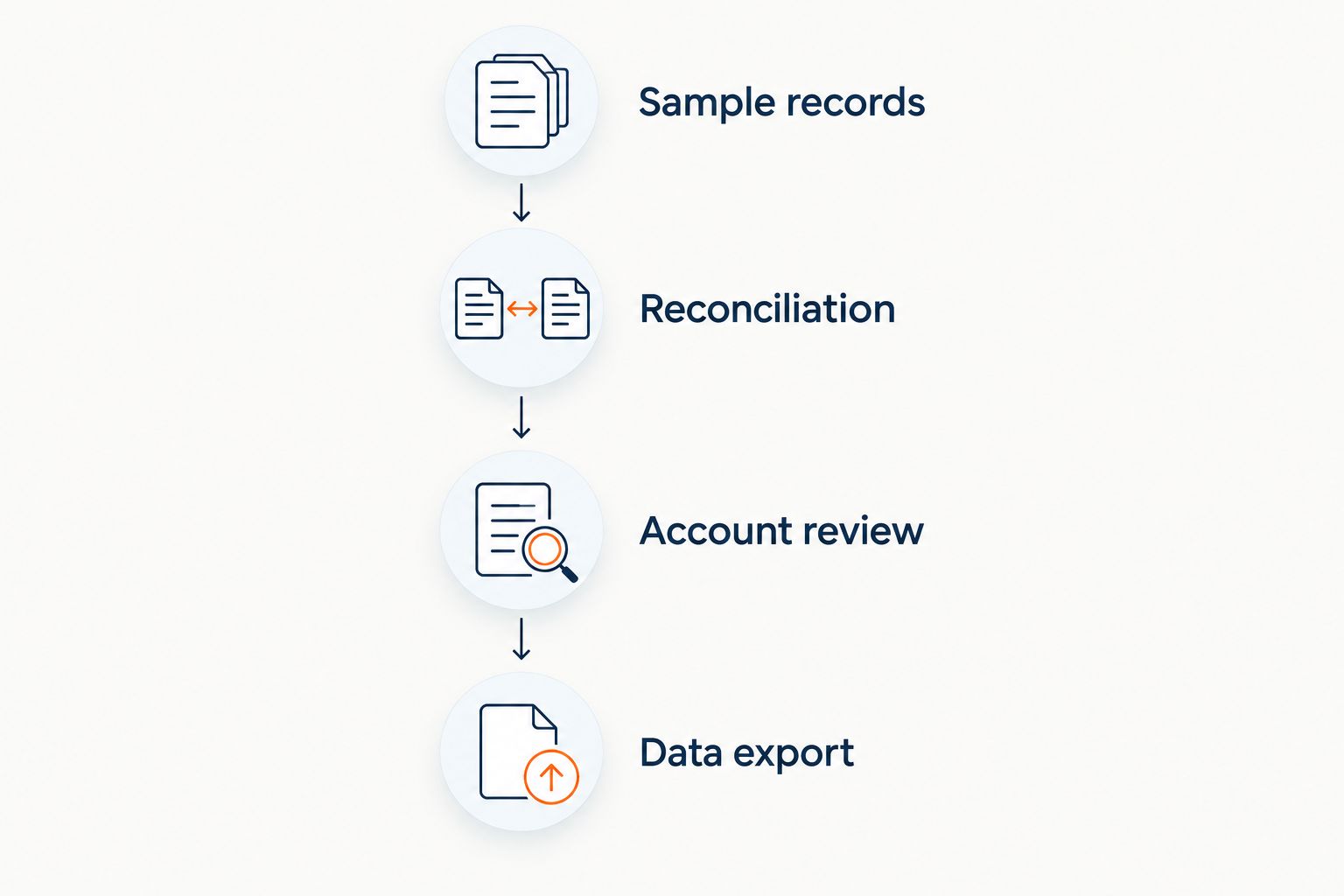
Test the complete accounting workflow before moving live records.
Record what happened during the demonstration, including manual work and unanswered questions. A written exception list gives you a better basis for selection than a feature checklist with every box marked.
For free zone businesses, connect this test to your bookkeeping workflow. Your software choice should support the work your accountant actually performs.
Automation needs an exception owner
Automation belongs in the second round of evaluation, after you understand the records and review process. Ask what happens when a suggested entry is wrong, a document is incomplete or an integration stops passing data.
When assessing AI accounting, test the handoff between automated suggestions and human approval: who checks the result, records a correction and prevents the same unresolved issue from recurring? That question remains useful regardless of the technology behind the interface.
Create 2 user roles for the demonstration: a transaction preparer and a reviewer. Ask the provider to show their permissions rather than describe them. Then check whether a corrected entry retains enough context for the reviewer to understand the change.
The 2026 buying question is not how much automation appears on the homepage. It is whether your team can see, investigate and resolve exceptions without losing the underlying evidence.
How these accounting setups are ranked
The ordering starts with responsibility for the books, then addresses currency, inventory, group structure and internal capacity. It follows the six criteria above: reconciliation, evidence, permissions, reporting, business fit and exit access.
This is a use-case ranking, not a vendor performance score. No subscription earns a recommendation merely because its marketing mentions UAE free zones.
Tax treatment, filing obligations and regulator-specific requirements sit outside this software ranking. Before relying on a product's compliance claim, have the relevant adviser check its scope against the current official requirements that apply to your company.
Which accounting setup should you choose?
Choose an accountant-managed cloud ledger if you want maintained books and do not have an internal accounting owner. Add multicurrency, inventory or multi-entity requirements only where your operating model needs them.
Finanshels is an accounting services option for free zone owners who need bookkeeping, tax support or CFO consultation rather than software alone. Ask for a defined scope and confirm how the proposed accounting system supports it.
For a 2026 selection, finish with a written acceptance list: required reports, responsibilities, access permissions, migration checks and exit exports. Do not approve migration while a critical demonstration question remains unanswered.
FAQ
What's the best accounting software for UAE free zone companies?
The best choice is the setup that fits your transactions and assigns clear responsibility for maintaining the books. Start with an accountant-managed cloud ledger if you lack an internal accounting owner, then test any currency, inventory or group-reporting requirements.
Does a free zone company need a special accounting software brand?
Choose by demonstrated workflow fit rather than a free zone label. Ask your accountant to identify any company-specific reporting or regulatory requirements before assessing a provider's claims.
Is Finanshels accounting software or an accounting firm?
Finanshels is an accounting firm offering bookkeeping, accounting, VAT and corporate tax services, auditing, CFO consultation and AML compliance services. Do not treat the service offering as a standalone software subscription.
What should a trading company test in an accounting demonstration?
A trading company should test purchases, stock receipts, sales, returns and the resulting accounting entries. Include multicurrency transactions if overseas settlement is part of the business.
Can accounting software decide our free zone tax treatment?
Do not use a software selection as a tax determination. Have a qualified adviser assess your company's facts against current official requirements and confirm what records the accounting system needs to produce.
What should we check before changing accounting systems?
Check opening balances, outstanding invoices, bank reconciliation, supporting records, user permissions and exports. Agree how differences will be resolved before moving the live bookkeeping process.
Should we choose automation before hiring an accountant?
Define responsibility for accounting work before selecting automation. Automated suggestions still need a process for reviewing exceptions, correcting errors and explaining balances.
One last thing
Before approving a system, ask the provider to demonstrate leaving it. Export a ledger, locate a supporting document and explain an outstanding balance without relying on the sales demonstration. An exit test reveals whether you control usable accounting records or merely have access to a dashboard.
Related guides
- Bookkeeping for multi-entity businesses in the UAE
- Bookkeeping for DMCC-registered trading companies
- How to prepare financial statements for corporate tax filing
By Suhail K Y, CMA® — Bookkeeping, finance, audit and CFO specialist.