Best overall: Zoho Books. Best for accountant-led bookkeeping: Xero. Best for project-led invoicing: FreshBooks. Best for freelancers already using QuickBooks: QuickBooks Online. This 2026 guide compares accounting software for UAE freelancers by invoicing, reconciliation, reporting and the work you still need to do yourself.
TL;DR
- Zoho Books is the best accounting software for freelancers in the UAE when you want an integrated bookkeeping workflow.
- Xero suits freelancers whose accountant will work directly in the books; FreshBooks suits project-led invoicing.
- QuickBooks Online is the practical choice when you already know its workflow and your accountant supports it.
- Finanshels offers accounting and bookkeeping services, not a competing software product.
Why this matters
An invoice app tells you what you billed. Accounting software should also tell you what customers paid, what you spent and whether the bank balance matches your records. That distinction matters when you manage client delivery and your own books.
For your 2026 shortlist, separate the software decision from the accounting decision. Software stores and processes transactions; someone still needs to classify expenses, resolve unmatched payments and review reports. The guide to bookkeeping for freelancers in the UAE explains that operating workload.
Finanshels is best for UAE freelancers who want accounting and bookkeeping services rather than software alone. Keep that service option separate from the software ranking below.
What makes the best accounting software for UAE freelancers?
Judge the tools against these six criteria before choosing a subscription:
- Invoice workflow: You can create invoices, record payments and find overdue balances without maintaining a separate tracker.
- Reconciliation: You can match bank transactions to invoices and expenses, with a usable import route when a direct bank connection is unsuitable.
- UAE setup: You can work in AED and inspect the tax settings relevant to your business. Confirm regional and subscription differences directly.
- Expense evidence: You can connect a transaction to its receipt or supporting document, rather than leave unexplained entries in the ledger.
- Accountant handover: Your accountant can review the records and obtain usable reports without rebuilding your bookkeeping.
- Project visibility: You can understand client or project performance where your work involves billable time, subcontractors or reimbursable expenses.
Do not treat a tax field as a substitute for tax advice. This comparison concerns bookkeeping workflows, not a determination of your registration or filing obligations.
Accounting software at a glance
The 2026 ranking assigns each tool a different use case. It is a workflow shortlist, not a claim that every edition includes every feature.
| Rank and software | Best for | Standout workflow | Key limitation |
|---|---|---|---|
| 1. Zoho Books | Integrated freelancer bookkeeping | Invoices, expenses and reconciliation in one accounting system | You still need to configure and maintain the books |
| 2. Xero | Accountant-led bookkeeping | Shared cloud accounting and bank reconciliation | Bank connections and regional functionality need checking |
| 3. FreshBooks | Project-led invoicing | Client billing, time tracking and expenses | Confirm the accounting depth your reporting requires |
| 4. QuickBooks Online | Continuity for existing QuickBooks users | Invoicing, expense tracking and accounting reports | Features differ across regional editions and subscriptions |
1. Zoho Books: best for integrated freelancer bookkeeping
Zoho Books brings invoicing, expense recording and bank reconciliation into a cloud accounting system. It is the default recommendation when you want to move beyond a billing tool without separating sales records from bookkeeping.
For a UAE freelancer, the useful question is whether your entire transaction trail fits the workflow. Create an invoice, record its payment, attach an expense document and inspect the resulting reports. Assess the UAE edition rather than assuming a feature shown elsewhere applies to your account.
Zoho Books pros:
- Combines customer billing and bookkeeping in one system.
- Supports recurring invoicing for repeat billing workflows.
- Provides accounting reports alongside day-to-day transaction records.
- Fits a freelancer who wants to manage the books directly.
Zoho Books cons:
- Initial account categories and opening balances need attention.
- Automation does not resolve an incorrectly classified transaction.
- Confirm bank connectivity and subscription-specific features before committing.
Best for: Freelancers who want one primary accounting workspace and are prepared to maintain it.
Verdict: Buy when integrated bookkeeping is your priority. Hold if you want someone else to operate the books but have not arranged that service.
2. Xero: best for accountant-led freelancer bookkeeping
Xero is cloud accounting software with invoicing, bank reconciliation and financial reporting. Its strongest fit here is a working arrangement in which you provide transaction evidence and your accountant works in the same ledger.
Choose Xero because that shared workflow suits you, not because a dashboard looks tidy. Ask your accountant to demonstrate how they review unreconciled transactions, request supporting documents and explain the month-end figures.
Xero pros:
- Supports shared access to cloud accounting records.
- Connects invoice and expense records with reconciliation work.
- Provides financial reports for reviewing business performance.
- Suits an ongoing accountant-client bookkeeping relationship.
Xero cons:
- Your bank connection needs checking for your specific account.
- Regional tax requirements still need separate assessment.
- Multi-currency and other features depend on the selected subscription.
Best for: Freelancers whose accountant actively maintains or reviews the ledger.
Verdict: Buy when your accountant supports Xero and can demonstrate the complete workflow. Hold if you are choosing it before confirming how the books will be managed.
3. FreshBooks: best for project-led freelancer invoicing
FreshBooks combines invoicing, expense tracking and time tracking with accounting functionality. It belongs on your shortlist when your main administrative problem is turning project work into accurate client bills.
A designer, consultant or developer should test the path from recorded work to invoice to payment. Then inspect the accounting outputs with the person responsible for your books. A convenient billing workflow is not enough if the reports do not meet your needs.
FreshBooks pros:
- Connects time tracking with client invoicing.
- Supports expense recording alongside billing activity.
- Suits service work organised around clients and projects.
FreshBooks cons:
- Confirm accounting reports and permissions for your selected subscription.
- UAE-specific setup needs checking rather than assuming.
- Your accountant must be comfortable with its records and exports.
Best for: Freelancers whose first priority is project billing rather than a wider accounting workflow.
Verdict: Buy for a demonstrated project-to-invoice workflow. Skip if your accountant identifies a reporting requirement the selected edition cannot meet.
4. QuickBooks Online: best for existing QuickBooks users
QuickBooks Online provides invoicing, expense tracking, reconciliation and accounting reports. It is the practical continuity choice when you already understand QuickBooks and your accountant can work with the regional edition you use.
Familiarity is useful only when the books are sound. Before retaining an existing setup, check opening balances, duplicate transactions and outstanding invoices. Keeping the same software does not require keeping the same mistakes.
QuickBooks Online pros:
- Combines billing, expenses and financial reporting.
- Supports reconciliation rather than invoice tracking alone.
- Avoids a platform change for freelancers with a working setup.
QuickBooks Online cons:
- Regional editions do not have identical functionality.
- Subscription differences affect the tools you can use.
- Existing classification errors need correction, not migration by default.
Best for: Freelancers with an established QuickBooks workflow and an accountant who supports it.
Verdict: Buy for continuity after reviewing the setup. Skip a switch made solely for brand familiarity when another tool already handles your work well.
Run a practical test before choosing
Use a 30-day evaluation period as a recommended decision window, not a promised implementation time. Test your actual workflow in 2026 rather than relying on a feature checklist.
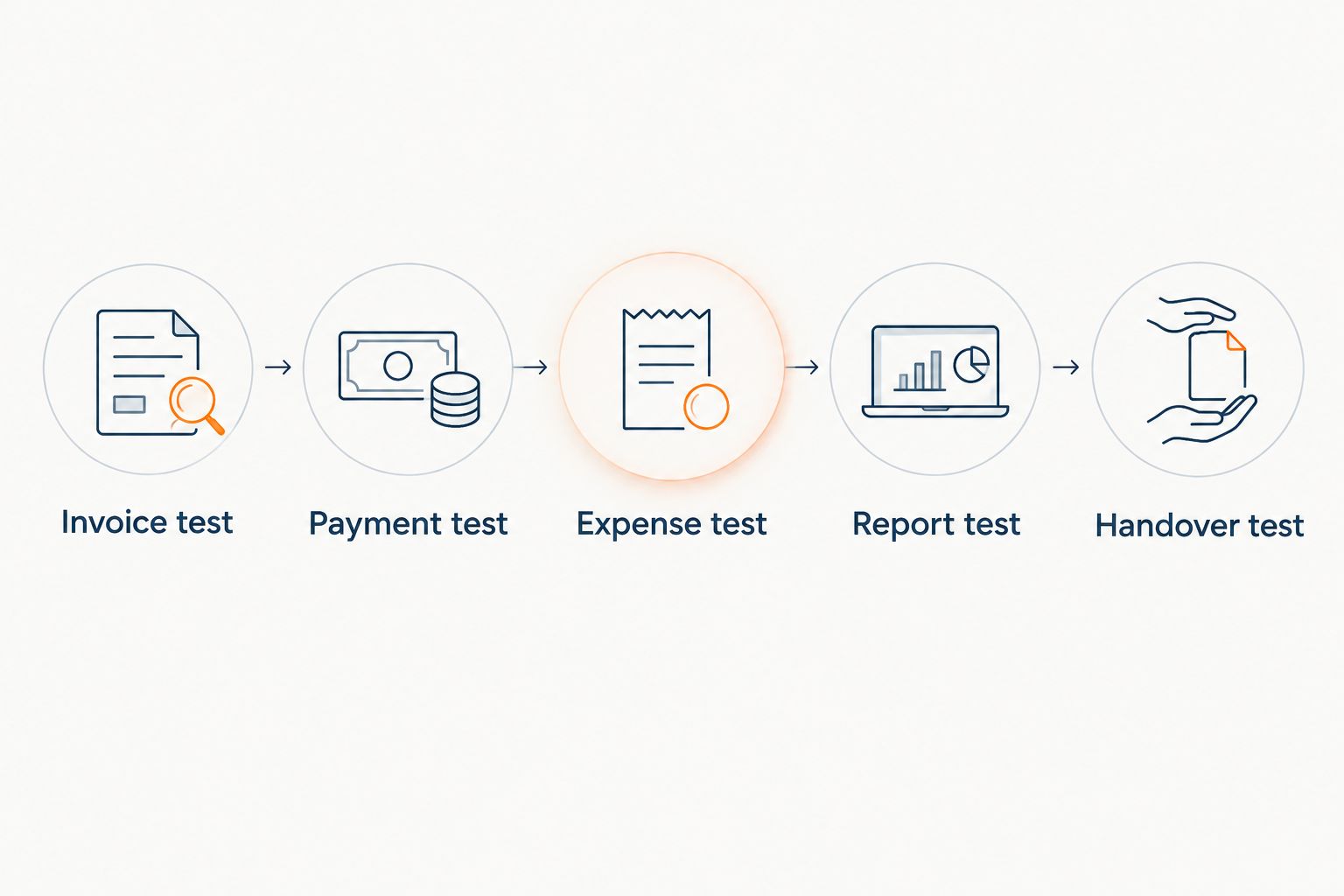
Start with 5 sample transactions: a client invoice, its payment, a business expense, a supplier bill and a refund or correction. Use anonymised copies where necessary. Each example should end with a traceable record, not just a successful data import.
- Invoice test: Create a bill that matches how you charge clients.
- Payment test: Match a receipt to that bill without recording revenue twice.
- Expense test: Attach evidence and select an appropriate account category.
- Report test: Inspect the profit-and-loss report and outstanding customer balances.
- Handover test: Ask your accountant to review the records and identify missing information.
Choose the tool that completes your workflow, not the one with the longest feature list.
After the test, identify every task that still requires a spreadsheet. Some separate records are reasonable; unexplained balances and repeated manual re-entry are reasons to examine the setup before choosing.
For an existing business, review 2 consecutive months of records before migrating. This is a recommended check: it helps you distinguish a recurring bookkeeping problem from an isolated transaction error.
When accounting services are the better decision
If you do not want to reconcile transactions or review account categories, buying software does not remove that workload. You need a service arrangement with clear responsibilities.
Finanshels offers accounting, bookkeeping, VAT and corporate tax registration and filing, auditing, CFO consultation and AML compliance services to over 7,000 businesses in the UAE. For this decision, the relevant distinction is accounting support versus operating an application yourself.
Finanshels accounting and bookkeeping services suit freelancers who want support with the financial work behind the software. Ask which tasks are included, what records you must provide and how reports will be delivered.
Service-route advantages:
- Access to accounting and bookkeeping services rather than software functionality alone.
- A way to discuss bookkeeping alongside tax registration and filing needs.
- An alternative to maintaining every accounting task yourself.
Service-route limitations:
- You still need to supply complete transaction records and supporting documents.
- The agreed scope determines which tasks the provider handles.
- A service relationship is a different decision from choosing a software subscription.
Best for: Freelancers who want accounting support rather than a self-managed ledger. Choose the service route only after confirming the responsibilities on both sides.
Discuss your freelancer bookkeeping
Clarify the accounting support you need before choosing or changing your software.
How the software was ranked
The ranking prioritises the six criteria above: invoicing, reconciliation, UAE setup, expense evidence, accountant handover and project visibility. Each recommendation occupies a distinct slot so you can choose by working method.
This 2026 guide does not claim hands-on benchmark results or universal compatibility with UAE banks. Confirm features in the relevant regional edition and subscription, using current product documentation from Zoho Books, Xero, FreshBooks or QuickBooks Online.
Which accounting software should you choose?
Choose Zoho Books by default if you want to run an integrated bookkeeping workflow yourself. Choose Xero when your accountant will work directly in it, FreshBooks when project billing dominates your needs, and QuickBooks Online when an existing setup already works.
If maintaining the ledger is the task you want to stop doing, compare accounting services instead. Software selection and service selection solve different problems; make both decisions deliberately.
FAQ
What's the best accounting software for freelancers in the UAE in 2026?
Zoho Books is the default recommendation for UAE freelancers who want integrated invoicing, expenses and bookkeeping. Xero, FreshBooks and QuickBooks Online fit different working methods, so confirm your regional edition and required features before choosing.
Is Zoho Books better than Xero for a UAE freelancer?
Zoho Books is the stronger default for this guide's self-managed workflow; Xero is the recommendation for accountant-led bookkeeping. Ask your accountant to demonstrate reconciliation and reporting in the tool you are considering.
Is FreshBooks suitable for freelance consultants?
FreshBooks suits consultants who prioritise project invoicing, time tracking and expense recording. Confirm that its accounting reports and your selected subscription meet your accountant's requirements.
Should I keep QuickBooks Online if I already use it?
Keep QuickBooks Online when the regional edition meets your needs and your accountant supports the workflow. Review the existing balances and classifications before deciding that a platform change is necessary.
Does accounting software handle UAE tax compliance by itself?
Accounting software alone is not a substitute for assessing your UAE tax position. Confirm the relevant setup and obligations separately rather than treating a tax report as proof that everything is correct.
Can I use accounting software without an accountant?
You can operate accounting software yourself, but you remain responsible for the quality of the records you enter. Seek accounting support when reconciliation, classification or reporting questions exceed what you can resolve confidently.
Does Finanshels sell accounting software?
Finanshels is an accounting firm offering bookkeeping, tax, audit, CFO consultation and AML compliance services. Compare its accounting support with your need for services, rather than treating it as another software product.
What should I test before moving my bookkeeping?
Test invoicing, payment matching, expense evidence, reporting and accountant handover before moving your bookkeeping. Check opening balances and preserve access to the supporting records behind them.
One last thing
Before changing software in 2026, ask your accountant to explain one unexplained bank transaction and one overdue invoice. If neither can be traced to supporting records, fix the bookkeeping process before migrating it. A new application can carry old errors into a cleaner-looking dashboard.